
 Blurt.blog
 BlurtForum
 Discord
 Wideo
Wideo
Welcome back to Blurt Core Updates, our round-up of what has changed on Blurt and, this time above all, where to find it and how to use it.
The last six weeks brought quite a few things you can actually touch:
- Post templates that follow you between devices
- Pinned posts at the top of your blog
- A proper image viewer, with gallery and zoom
- A recovery account to protect you if you ever lose your keys
- A privacy switch for your blog and profile
- Much stronger protection against the scam accounts that have been circulating
Let's walk through them.
## Before anything else: protect your keys
Fake "Blurt airdrop" pages are circulating in comments. They look like blurt.blog and ask you to "claim" free coins by typing a key.
There is no airdrop. blurt.blog, the Blurt Wallet and the Blurt team will never ask you to enter a key to claim, verify or unlock anything.
If a page asks for your keys, close it. Never paste your master or owner key into any website. If you already did, change your keys right away from the wallet (Wallet → Change Password).
blurt.blog
Post templates that follow you everywhere
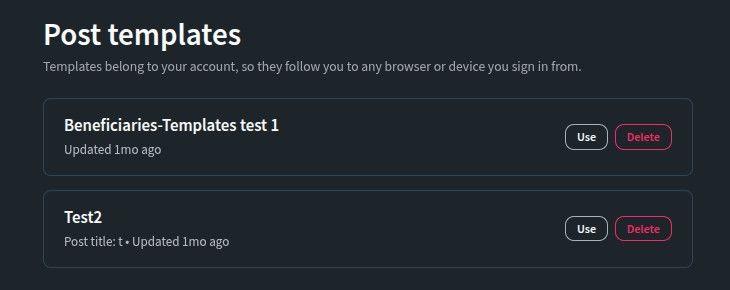
If you publish the same kind of post regularly (a weekly report, a contest, a photo series), templates save you from rebuilding it every time. Until now they were stored in your browser, so they disappeared if you cleared your data, and they didn't exist on your phone if you had made them on your computer.
Templates now belong to your account. Save one on your laptop and it's there on your phone.
Where to find it:
- Open your account menu (your avatar, top right) and choose Templates, right next to Drafts. From there you can open a template in the editor or delete it.
- In the editor, open Advanced settings to save the current post as a template, or load one. Templates remember your beneficiaries too.
- If you had templates saved the old way, the editor asks you once to move them to your account, and only clears the old copy after every template is safely stored.
(#181)
Pin your best posts to the top of your blog
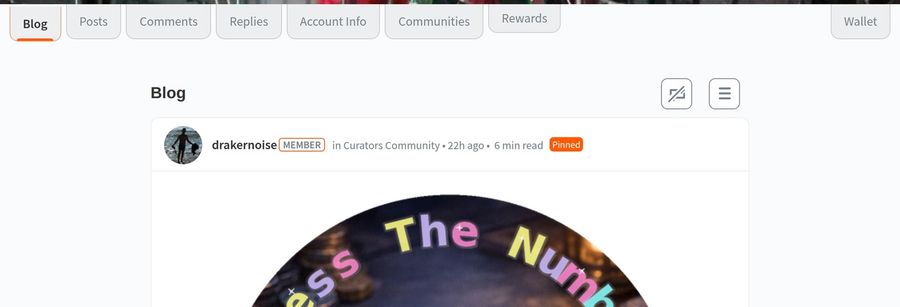
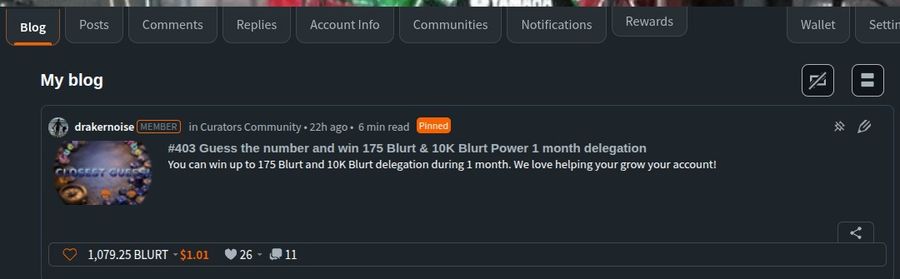
Your blog is a timeline, so the post you most want people to see (an introduction, your rules, a running contest) sinks under everything you publish after it. Now you can pin up to three posts to the top of your blog, the way communities pin posts in their feed.
How to do it:
- Open one of your posts and click the pin icon next to the edit pencil, or click the same icon in the corner of the post's card on your Blog or Posts tab.
- Confirm, and the post moves to the top of your Blog with a Pinned label, for everyone who visits your profile.
- Click the icon again to unpin it.
It works for community posts too. A post you published in a community normally doesn't appear on your Blog. Pin it, and it does.
(#222, #223, nexus-go #95, #104)
A real image viewer
Click any image in a post or comment and it opens full screen, at full resolution. If the post has several images you can flip through them like a gallery: arrows, the keyboard's left and right keys, or a swipe on your phone.
You can also zoom in to see the detail: mouse wheel or double-click on a computer, pinch or double-tap on a phone, then drag to look around. Close it with the ×, by clicking outside the image, with Escape, or with your phone's back button.
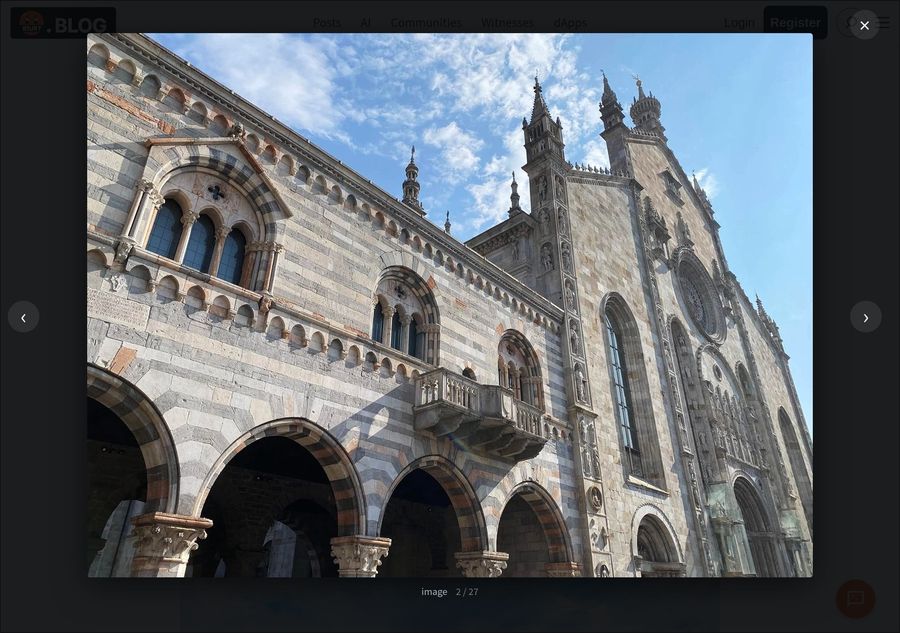
Photo from @hangin's post on Lake Como.
(#189)
Replying is now obvious
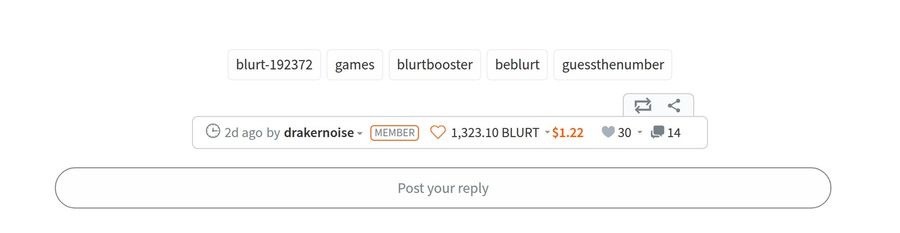
At the bottom of every post there is now a "Post your reply" box, next to your avatar, just like on other social sites. Click it and the reply editor opens right there. The same box appears under each comment in your Replies tab, so you can answer people without leaving the list.
Voting on older posts still counts
A post earns rewards for seven days. After that, a vote can't pay the author directly, and until now the site didn't tell you so.
Now, when you vote on a post whose seven days are over, a short notice explains what happens: your vote prompts @appreciator-app to leave a comment under that post with the author as its beneficiary, and votes on that comment do reach the author. If that comment already exists, the notice takes you straight to it. You decide whether to go ahead. It's a simple way to tell an author that an older post is still worth something.
Protection against scam accounts
Over the last weeks, some accounts have been spamming comments that point to a fake "Blurt airdrop" page built to steal people's keys. The site now fights this on several fronts:
- Scam accounts are visibly marked. Accounts on the community abuse list (COAL) for scams now show their profile, posts and comments behind a diagonal SCAM band with a clear reminder: never enter your keys. You can still choose Show anyway, and if you're logged in you can mute the account right from the band.
- Their links stop working. Even if you reveal the content, every link in it is removed, so there's nothing to click by accident.
- Their comments move out of the way. Instead of showing up in the middle of a conversation, comments from these accounts are grouped at the end of the thread behind a single control.
- Known phishing addresses are hidden, including the shortened links used to disguise them. The list now updates in minutes, without waiting for a new release of the site.
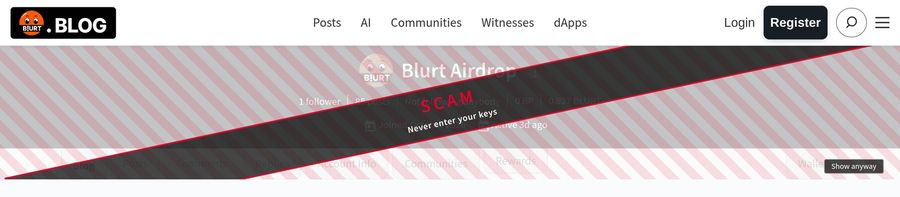
Remember: blurt.blog will never ask for your keys to "claim" anything. If a page does, close it.
(#202, #211, #214–#217, #219–#221)
Safer publishing
- Beneficiaries are checked before you publish. A beneficiary is an account that receives part of a post's rewards. If you type an account that doesn't exist, the editor now marks it right in the field, instead of letting the post fail silently. (#199)
- The automatic shares are shown honestly. Posting in a community gives it 3%, and the account that invited you gets 3%. The editor now lists each share with where it comes from, and the total always matches what is actually sent to the blockchain. (#176)
- Confirmations say what you're doing. Publishing used to ask you to "Confirm Comment" even for a post, and muting or following asked you to confirm a "Custom Json". Every dialog now names the real action: Confirm Post, Confirm Edit, Mute account, Unmute account, and so on. (#193, #204, #205)
- After publishing, you land on your own Posts tab, where your new post shows up immediately, so you can see it worked. (#194)
- Deleting a post shows its progress and confirms when it's done, and a deleted post no longer pops back up when you refresh. (#196)
Smoother everyday browsing
- Your phone's back button closes pop-ups instead of leaving the page behind them, and a back-to-top button appears on long pages. (#182, #187)
- Feeds are more reliable. Blurt.blog reads from several servers. It now shows a post once two of them agree it exists, so deleted posts stop coming back and new ones appear quickly. If one server is down, your feed no longer waits for it. (#197, #198)
- Your own votes show after a reload. A post you voted on now keeps its filled heart when you refresh the page. (#190, #210)
- The vote weight slider works on phones. It no longer closes while you're still adjusting it. (#208)
- The editor closes reliably on iPhone, including in private browsing. (#191)
A cleaner, more consistent look
Buttons, pop-ups and close controls now look and behave the same on every page, and the whole site uses the official Blurt orange. Around 150 pieces of text that were still in English are now translated into all nine languages the site offers. (#182–#186, #212, #213)
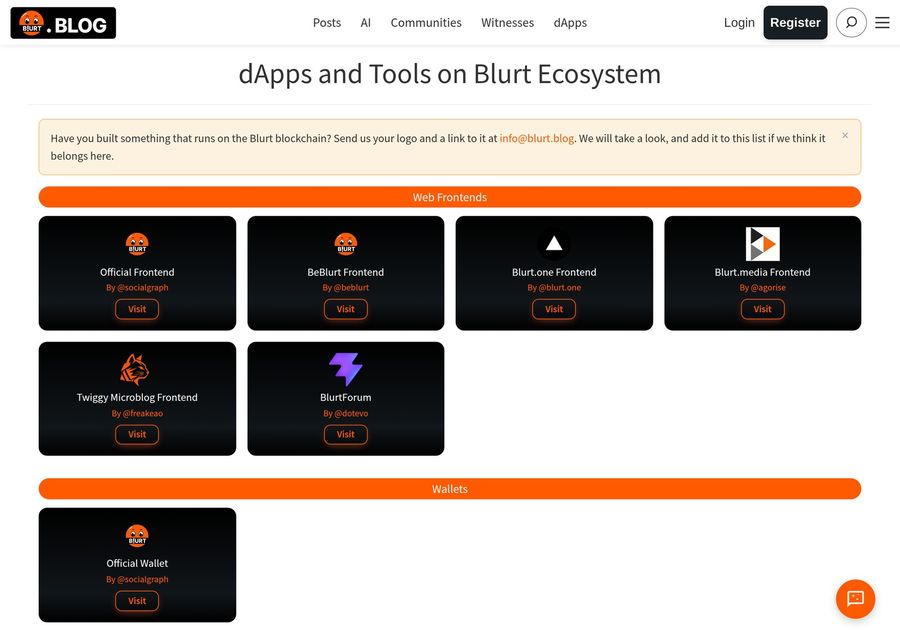
The dApps directory (the dApps link at the top) has also been redone. Each project now shows its own logo on a compact card, so you can see the whole ecosystem at a glance. Built something on Blurt? The page tells you how to get it listed. (#218)
Also new in the side menu (☰):
- Docs: a link to the new manual at docs.blurt.blog.
- Brand guidelines: how to use the Blurt name and logo, with permission to use them for community promotion and merchandise.
- Logo Merch: now points to the current store.
- Updated Terms of Service and Privacy Policy: the new contact addresses are all on the blurt.blog domain.
(#183, #185, #200, #201, #207, #209)
Blurt Wallet
Choose who can recover your account
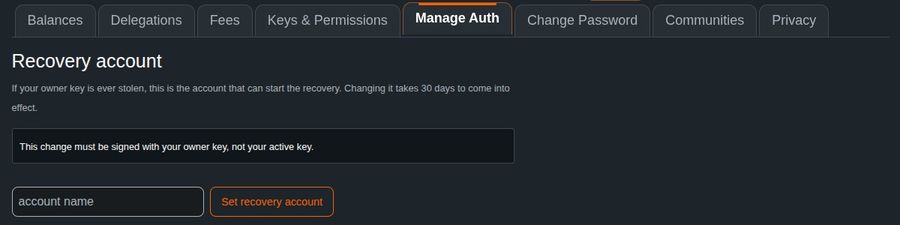
Every Blurt account has a recovery account: the account that can help you get yours back if someone ever steals your owner key (your most powerful key). Many accounts have never chosen one, and until now the wallet gave you no way to change it.
Where to find it: log in to the wallet, open Wallet → Manage Auth (blurtwallet.com/@yourname/manage-auth), and scroll to the Recovery account section. It shows who your recovery account is today, lets you choose a new one, and lets you cancel a change you've requested.
Good to know:
- This change needs your owner key, not your usual active key.
- For your safety, a new recovery account takes 30 days to come into effect. The wallet shows the exact date, and your current setting stays in force until then.
(#51)
Hide your blog and profile
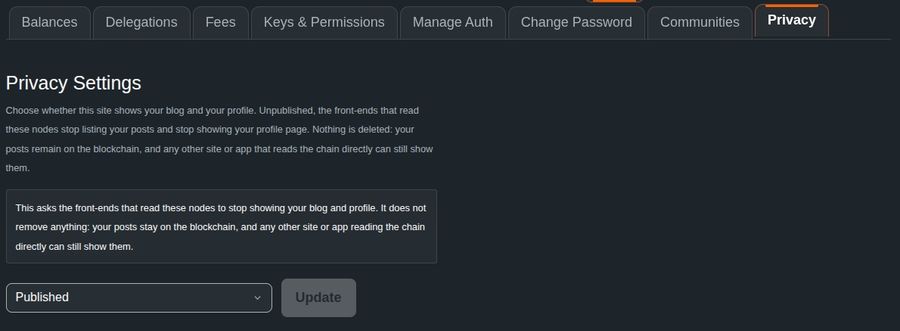
You can now ask Blurt's websites to stop showing your blog and profile.
Where to find it: log in to the wallet and open Wallet → Privacy (blurtwallet.com/@yourname/privacy). Choose the setting and press Update. The page tells you how many of Blurt's servers have applied it.
What it does and doesn't do: blurt.blog and the wallet stop showing your blog and profile, and your posts disappear from feeds and search. Nothing is deleted, though. A blockchain is public by design, so an app that reads the chain directly can still show your content. You can switch it back at any time.
(#53, nexus-go #102)
A fuller burn monitor
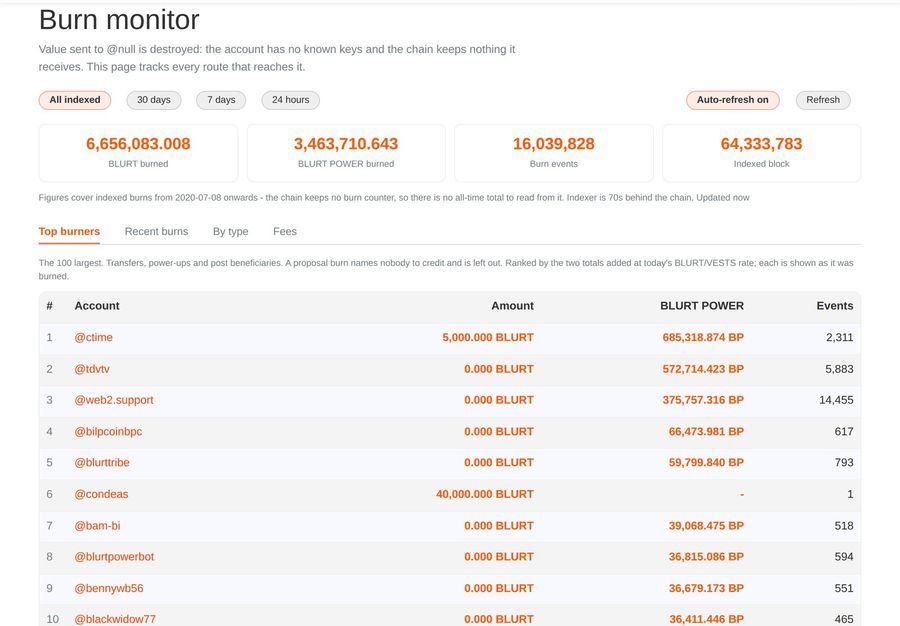
The Burn monitor (in the wallet's side menu, or at blurtwallet.com/burn-monitor) shows how much BLURT has been permanently destroyed. Its Top burners ranking now:
- counts burns made by setting @null as a post beneficiary, credited to the post's author, so authors who burn their rewards this way finally appear;
- shows burned BLURT POWER in its own column;
- lists the top 100, twenty per page;
- is translated into all of the wallet's languages.
(#55, #57, #58, wallet-indexer #10)
Smaller touches
- Your balances show a small arrow, a hint that clicking an amount opens the actions you can take with it (transfer, power up, and so on). (#52)
- The official Blurt orange throughout, and the same merch link as the blog. (#49, #50)
Under the hood
You won't see these directly, but you'll feel them.
- A snappier wallet and blog. Blurt.blog and the wallet read from a list of servers. Two of them had stopped answering, and some pages waited for them until they gave up, up to ten seconds in the wallet's Privacy tab. They are gone from the list, and the wallet no longer waits on the slowest server when it only needs one answer. (condenser #224, wallet #59)
- Faster "New" feeds. The server behind feeds and communities (nexus-go) gained a database index for the newest-first feed. That query went from about 130 milliseconds to under one. (nexus-go #100)
- Images that don't disappear. An image uploaded through one server used to break if that server went offline, even though the file itself was safe. Servers can now find those images on each other's behalf, so old posts keep their pictures. (nexus-go #97, blurt #422)
- Deletes that stick. Deleting a draft or a template now holds across every server, even one that was offline at the time. (nexus-go #93, #94)
- A sturdier blockchain node. blurtd, the software that runs the Blurt blockchain itself, now checks a post's beneficiaries more strictly, and only starts answering requests once it is fully ready. (blurt #423, #424)
- Better tested. Blurt.blog now runs its full automatic test suite, more than 500 tests, on every change before it ships. (#178–#180)
The manual keeps growing
The documentation at docs.blurt.blog has been updated with everything in this edition: how templates, feeds and scam protection work in blurt.blog; the recovery account, privacy and burn monitor in the wallet; and the new backend capabilities. It's now one click away from the blog's side menu, under Docs.
That's edition two. If you build on Blurt, every item above links to its merge request. If you just use Blurt, the short version: try the new image viewer, check who your recovery account is, and share this post with anyone new to Blurt.
## One last time: your keys are yours alone
No airdrop, giveaway, "verification" or support agent will ever need your keys. blurt.blog and the Blurt Wallet never ask for them to claim anything. If a page does, close it, mute the account that sent you there, and warn the people you know.
Made with passion and love by:
— The Blurt Core Team
Komentarze